
A Product Photography Setup That Costs Less Than One Bad Photo Shoot
By Steve · updated November 2026
Somewhere online right now is a list of camera gear for product photography that adds up to more than most small businesses spend on marketing in a year. Almost none of it is the reason your product photos look off. There's a specific, much shorter list of things that actually decide whether a photo makes someone stop scrolling, and I'll walk through it in the order it matters.
- The setup that matters most costs nothing extra: one light source and a plain background.
- One habit ruins more phone photos than the phone itself ever does.
- Consistency across your whole catalog beats one perfect shot next to five mismatched ones.
The one thing that ruins more photos than a bad camera
Mixed light. A window on one side and an overhead bulb on the other, both hitting your product, and the result is a color cast your eye barely notices but a camera records honestly.
The fix is picking one light source and turning off or blocking the rest.
Once that's settled, the next decision is where that one light source should come from, and it's not where most people assume.
Where the light should actually come from
Soft, indirect daylight from a window. Direct sun through a window creates a hard shadow edge that reads as harsh on a screen.
Midday isn't the best time. The light is flat and can wash out texture. Late morning or mid-afternoon, when the sun is at more of an angle, tends to shape a product better.
A north-facing window, if you have one, stays consistent for longer through the day than a south-facing one that shifts fast. A sheer curtain over the window softens things further if the light still looks harsh once it hits your product.
A cloudy day is a gift here. Overcast light is naturally diffused, which is exactly what a small reflector or a lightbox is trying to fake.
The background that photographs make look expensive
A plain white sheet, a poster board, or a stretch of clean wall near that window. That's the whole setup for most product categories, and it costs what's already in the house.
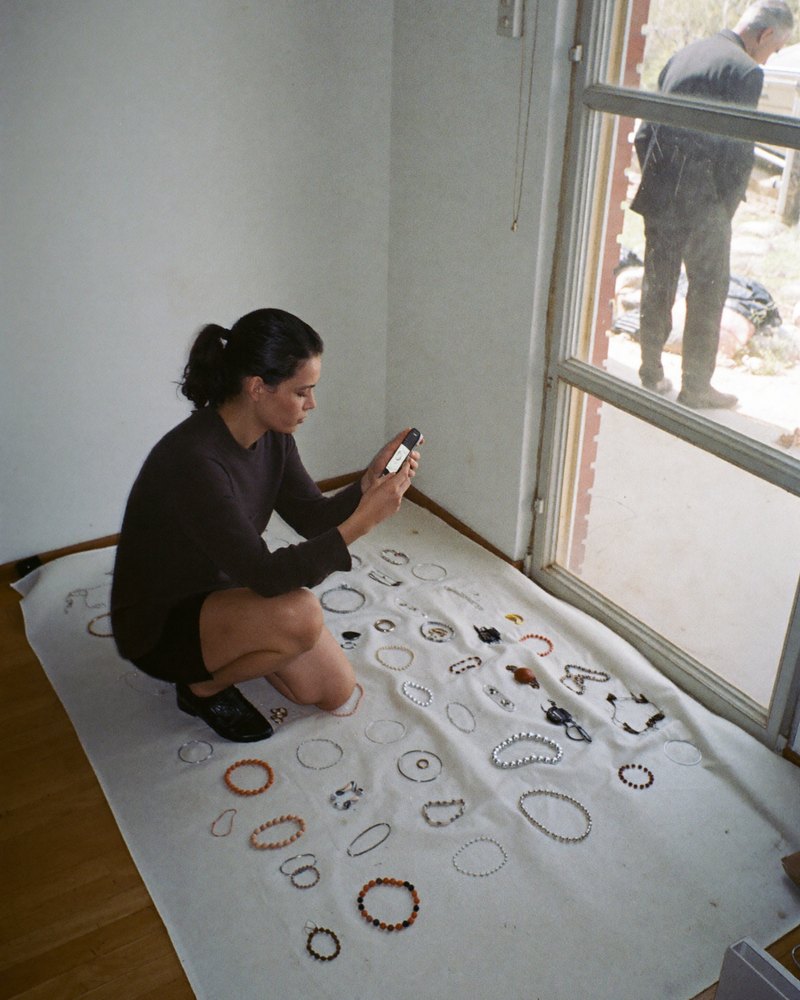
The picture above is the entire kit: a phone, a window, and a plain surface. Small items like jewelry benefit from getting close, filling the frame, and keeping the background genuinely blank rather than busy.
With light and background settled, the phone itself stops being the limiting factor. The next mistake is the one almost everyone makes without noticing.
What actually makes a photo look like it belongs to a real business
Here's the reveal: consistency across every photo matters more than any single photo being perfect. The same background, the same light direction, the same angle across your whole catalog is what reads as professional. One gorgeous shot next to five mismatched ones reads as amateur, even though the gorgeous one is technically better.
Set your light and background up once, photograph everything in that same session if you can, and you get a catalog that looks like one business made it. Write down the distance and angle you used for the first product, and repeat it for the rest instead of eyeballing each one fresh.
I built a short brief that walks through exactly which shots to take and which to skip for that purpose, so this session doesn't go to waste on the wrong angles: download the photography brief.
The zoom button is doing more damage than your phone's camera
That consistency is worth protecting, and one habit undoes it fast even after you've nailed the light and background: pinch-zooming on a phone crops and stretches the image instead of actually zooming in, and it costs sharpness every time.
Move your feet instead. Get physically closer to the product, or physically farther and crop the photo afterward in an editing app, which keeps the full resolution intact.
That single habit change fixes more blurry product shots than any accessory does, and it's the last thing standing between this setup and a catalog worth showing customers.
Where these photos should actually go
A great product photo sitting only on your phone does nothing for your business. It has to land on your Google Business Profile, your site, and wherever customers are deciding whether to trust you before they've met you.
Get the setup right once, and every product you add afterward gets the same clean result without relearning any of this.
- One light source, blocking or turning off the rest.
- A plain background: white sheet, poster board, or clean wall.
- Move your feet instead of pinching to zoom.
Frequently asked questions
Can I take good product photos with just my phone?
Yes, for most small business catalogs. The light and the background decide far more than the camera does, and a modern phone camera is more than capable once those two are right.
What's the best time of day for product photos?
Late morning or mid-afternoon near a window, when daylight is soft and slightly angled. Direct midday sun through a window tends to flatten texture and create harsh shadow edges.
Should I use a lightbox or a tripod?
Both help once you're photographing regularly, but neither is required to get a usable, consistent photo. Start with a window and a plain background, and add equipment only if you find yourself photographing products often enough to justify it.
How do I make my photos look consistent across my whole catalog?
Set your light and background up once and photograph as many products as you can in that same session, from the same angle and distance. Consistency across the set matters more than any single photo being perfect.
Where should these photos actually be used?
Your Google Business Profile and your website, at minimum, since that's where a customer is deciding whether to trust you before ever talking to you. A photo that never leaves your phone doesn't do anything for the business.
Do I need to edit the photos afterward?
A little goes a long way: straightening the crop, checking the white balance looks natural, and cropping without zooming in-camera first. Heavy filters usually work against you on a product photo, since customers want to see the actual item.
I want photos that actually make my Google profile and my site look trustworthy
Start with your Exploration and Analysis. Requesting it costs nothing, and I'll tell you what's right for you first.